Roscongress
- 0.0
- Rating
- 10.00K
- Installs
- Free
- Price

 Analysis by App-foxy
When I open an event app, I want it to answer a simple question quickly: what is happening, where does it matter to me, and what do I need to do next? Roscongress is built around that event-focused need rather than trying to become a general social network or an all-purpose news reader. It comes from The Roscongress Foundation, and its store presence places it in the Events category as a free app for everyone.
My impression is that this is most useful as a companion for people who already have a reason to follow Roscongress activities. It can be a practical place to begin when preparing for an event, checking information while moving between sessions, or keeping event-related material separate from ordinary phone apps. It is less compelling for someone who only wants a broad list of unrelated local happenings.
What the app is really for
The name and developer make the app’s purpose fairly clear: it is tied to the Roscongress Foundation and its event ecosystem. That context matters when deciding whether to install it. This is not the kind of application I would choose as my only discovery tool for concerts, community meetings, exhibitions, or casual weekend plans. Its value depends on whether Roscongress is relevant to your professional, public, or event-related interests.
You May Also Like

 Blood Strike: 2.5 Anniversary
Blood Strike’s Loadouts Turn Every Drop Into a Tactical Gamble
A close look at Blood Strike’s custom loadouts: how fast access to signature weapons reshapes its battle royale rhythm, rewards preparation, and narrows the gap between fights.

 Pandora - Music & Podcasts
Pandora’s Music Is Easy to Start, but Harder to Recover
Pandora’s strength is its low-effort path from a seed to a station. Its weak spot is how much confidence it asks you to place in connection, setup, and quiet recovery.

 8 Ball Pool
 Is Built on Rivalries, Rematches, and Routine
A close look at the rivalries, rematches, shared routines, and unanswered safety questions that turn a quick pool match into a persistent mobile community.

 Samsung Music
’s Quiet Strength Is Playing What You Already Own
Its reach comes less from spectacle than from dependable access to a personal library. That simplicity is both the app’s strongest retention engine and its ceiling.

 AccuWeather: Weather Radar
AccuWeather Review: A Quick, Clear Forecast for Everyday Decisions
For everyday plans, the best forecast is the one you can understand quickly. AccuWeather makes rain timing, radar, and local conditions easy to act on, with a few trade-offs.

 Hill Climb Racing
Why Hill Climb Racing Still Turns Crashes Into One More Run
A tiny car, a bumpy hill and one more upgrade: Hill Climb Racing keeps resurfacing because its simple chaos makes every near-miss feel personal.
More From Our News Desk



I find that distinction helpful because event apps often fall into two groups. Some are broad platforms where anyone can search through many organizers and categories. Others are focused tools connected to one organizer or event family. Roscongress belongs much more naturally in the second group. The narrower focus can be a strength: information is less likely to be buried under unrelated listings. The trade-off is obvious too: if you are not following the foundation’s activities, there may be little reason to keep it installed.
The app is free, which removes the most immediate barrier to trying it. It is also marked suitable for Everyone, so its store positioning is not restricted to a specialist age group. That does not automatically make every event or every piece of content personally relevant to every user, but it does make the app approachable for a wide audience. I would still treat it as an event utility first and as a general-purpose app second.
Trust starts with knowing who is behind it
For an event application, the developer is more than a line in a store page. It helps me understand why the app exists and what kind of relationship I should expect. Here, The Roscongress Foundation is clearly identified as the developer. That gives the product a defined institutional context instead of making it look like an anonymous event directory assembled by an unknown publisher.
That context does not mean I would install it without thinking. I still prefer to review the app’s visible choices during setup and use it only for the purpose that brought me there. A recognizable developer can make an app easier to place, but good digital habits still matter: I avoid granting access that is unrelated to the task, and I pay attention whenever the app asks me to create an account or share personal details.
The current version shown for the app is 605.5.2, and it requires Android 8.0 or later. In practical terms, that makes compatibility a quick thing to check before planning to use it on an older phone. If your device runs a newer Android release, the main question is less about age and more about whether the app fits your event needs. The published install figure is over ten thousand, which suggests a focused audience rather than a mass-market utility.
What I would check before signing in
My first pass with an event app is deliberately cautious. I look at what can be viewed without an account, whether the app explains why sign-in is needed, and whether there is a clear way to leave or change an account later. Those details tell me more about user control than a polished event screen does.
With Roscongress, I would treat account creation as a decision rather than an automatic step. If I only need to inspect event information, I would first see how far I can go without registering. If participation, saved schedules, or other personal tools require an account, I would use a dedicated password that I do not reuse elsewhere. That is a small but worthwhile precaution for any event service.
I also pay attention to whether the app gives a meaningful explanation before requesting device access. A calendar, location, camera, contacts, or notification permission can each be useful in some event workflows, but usefulness depends on the exact action. I do not approve a permission merely because the app asks for it. I approve it when I understand the benefit and can turn it off later without losing access to the basic purpose of the app.
Data-sensitive moments during event planning
Event applications can become more personal than they first appear. A schedule may reveal where I plan to be, a profile may connect me with an organization, and notifications may expose event-related information on a locked screen. Even when the app is free, I consider these moments before adding details that are not essential.
For example, if I am preparing for a busy day, I would avoid putting sensitive notes into any optional profile field simply because it is available. I would also review notification previews on my phone. A useful reminder is not worth much if it displays private event details to anyone who sees the screen. The safest setup is usually the one that gives me the information I need while keeping unnecessary personal context out of the account.
Another practical point is shared-device use. If I use a family tablet, a work phone, or a device that colleagues can access, I would be more careful about staying signed in. Event apps are often opened quickly in public or professional settings, and an unattended session can reveal more than intended. Signing out when appropriate and using the device’s own lock controls are simple ways to preserve control.
I also prefer to separate event planning from identity building. If the app offers optional profile information, I would add only what improves a specific task. A name needed for registration is different from a detailed biography, contact list, or broad set of interests. The useful question is always: will this information help me attend, organize, or follow the event? If not, I would leave it blank.
A realistic day with the app
Imagine that I am preparing to attend a Roscongress-related event. Before leaving, I would use the app to orient myself around the event rather than trying to manage every part of the day from one screen. I would check the information that affects my plan, note anything I need to remember, and decide which notifications are genuinely useful.
On the way there, I would avoid repeatedly changing settings or entering unnecessary personal information while distracted. Public transport, queues, and crowded venues are poor places to make rushed privacy decisions. I would rather prepare the account and notification choices at home, then use the app during the event for focused reference.
At the venue, the best workflow is to keep the app as a quick companion. I would check the next item I care about, close it when finished, and avoid leaving a personal session open on a shared screen. If the app presents a prompt that is not relevant to my immediate goal, I would postpone it instead of accepting automatically.
Afterward, I would review whether I still need notifications or an active account. This is an overlooked step with event apps: people install them for a particular occasion and then forget that alerts or stored details remain useful only temporarily. Removing unneeded permissions, disabling alerts, or uninstalling the app after the event is a reasonable part of managing it. The free price makes that decision easy, because there is no subscription to justify keeping it installed.
Where user choice matters most
I judge an event app by how easily it lets me make small, reversible decisions. Can I decline an optional request and continue? Can I limit notifications? Can I correct my details? Can I stop using the account without having to keep the app on my phone? These questions are more important to me than a long list of features.
My advice is to create a short personal checklist before using Roscongress:
- Use the app only for the event-related purpose that brought you to it.
- Choose a unique password if registration is required.
- Allow device access only when the requested action clearly needs it.
- Keep notification previews private if your phone is visible to others.
- Review the account and alerts after the event has finished.
That checklist is not a criticism of this particular developer; it is the sensible way I approach any focused event service. The important point is that the app should remain a tool I control, not something that quietly expands into a permanent profile of my activities.
If you are wondering whether you need an account, my practical answer is to test the available experience first. Use the public parts of the app if they meet your need. Register only when a specific function makes it worthwhile. If you are wondering whether it works on your phone, the minimum requirement is Android 8.0, so checking the operating system is straightforward. If you are wondering whether it costs anything to download, it is free.
How it compares with familiar alternatives
The usual alternative is a browser search. For a single event, that can be enough, especially if you only need a date, a venue, or a basic announcement. A browser is also better when you are comparing many unrelated events or searching across different organizers. I would choose that route for broad discovery.
A general calendar app is another alternative. It is stronger for combining personal appointments with work meetings and travel plans. However, a calendar usually depends on me entering or importing information; it is not necessarily the best place to follow an organizer’s own event context. Roscongress makes more sense when I want a dedicated place for that foundation’s activities rather than another entry in a crowded calendar.
Event platforms with many organizers can be more flexible, but they may also introduce more noise. If I am attending something connected specifically with Roscongress, a focused app can reduce the effort of filtering unrelated material. The trade-off is that I should not expect it to replace a broad event marketplace, a full travel planner, or my everyday calendar.
That comparison also explains who should skip it. I would not recommend installing it merely because it is free if you have no connection to Roscongress events. I would also skip it as a primary solution if your main goal is discovering local entertainment, managing a private invitation list, or coordinating a group through a general-purpose planning service. A narrower tool is not automatically better; it is better when the narrow purpose matches your need.
Small habits that make the experience safer
One useful habit is to separate preparation from attendance. I would make account decisions, notification choices, and optional profile edits before arriving. That leaves less pressure to accept prompts in a crowded venue or on a weak connection. It also makes it easier to notice whether a request is genuinely related to the task.
A second habit is to use the least revealing notification setting that still helps. If I only need a reminder, I do not necessarily need the full message displayed on the lock screen. This is especially relevant for professional events, where even a title or participant-related notice may be more information than I want visible in public.
A third is to keep a record of what I chose during setup. I do not mean taking a screenshot of everything; I simply pay attention to whether I created an account, enabled alerts, or allowed device access. That makes cleanup much easier later. Event apps are temporary for many users, so a deliberate exit is part of a good experience.
Finally, I would keep the app updated through the normal store process when I intend to rely on it for an upcoming event. The listed version is 605.5.2, but version details can change over time. Checking for an available update shortly before an important day is sensible, while still avoiding last-minute experimentation with unfamiliar settings.
My cautious verdict
Roscongress is a focused free Events app from The Roscongress Foundation, and I see its strongest use case in helping people who already need to follow Roscongress activities. Its defined developer gives it a clear identity, while its narrow purpose keeps the decision simple: install it when the event connection is relevant, not as a replacement for every other planning tool.
I like the idea of using it selectively, with notifications and account details kept to the minimum that supports the event. The main friction is not the price or the age rating; it is the possibility that a specialized app may offer little value outside its intended audience. I would also want to make my own checks during setup rather than assuming that every permission or profile field is necessary.
For someone attending or following a Roscongress event, I would recommend giving it a careful try on a compatible Android device. For everyone else, a browser, calendar, or broader event platform may be the more useful choice. The best way to use Roscongress is as a temporary, purpose-driven companion: keep the controls visible, share only what helps, and remove the app when it no longer earns a place on your phone.
FAQs for Roscongress
01What is the main purpose of the Roscongress app?
The Roscongress app is designed to enhance user experience at events organized by the Roscongress Foundation. It provides attendees with essential event details, including agendas, speaker profiles, venue maps, and networking opportunities. This app aims to streamline event participation, making it easier for users to access information and connect with other participants.
02How user-friendly is the Roscongress app interface?
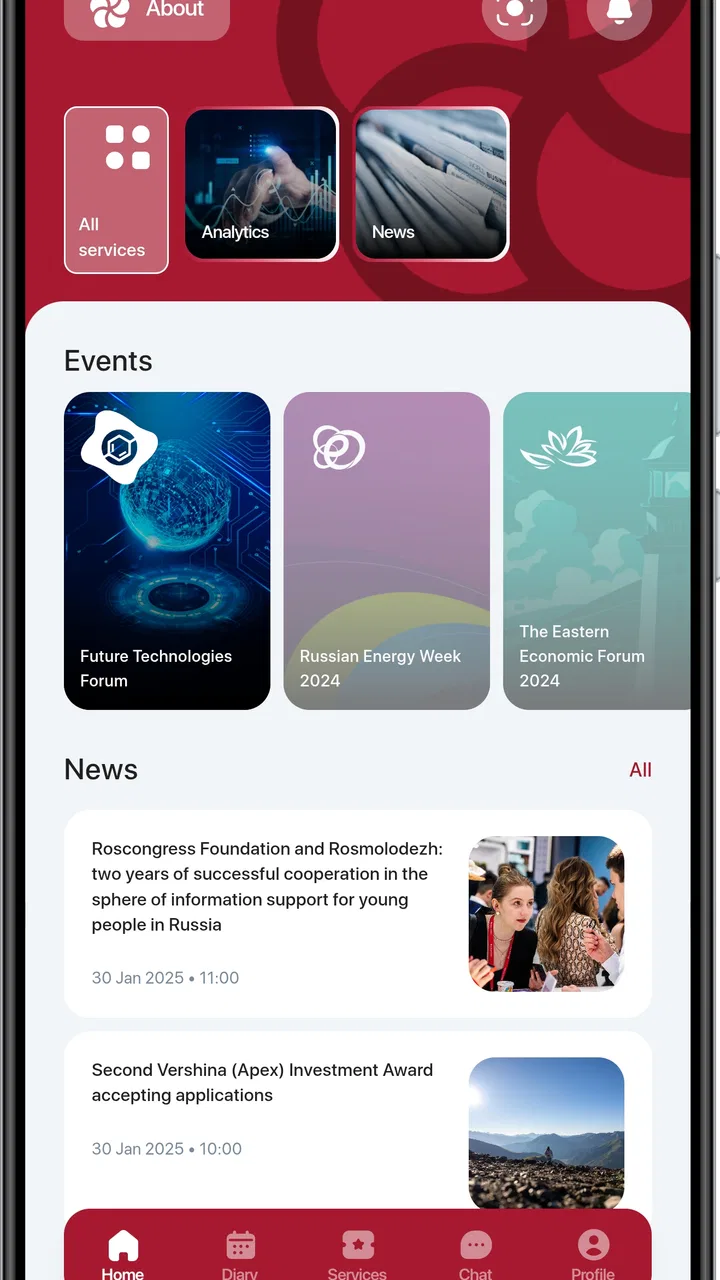
The Roscongress app features an intuitive and user-friendly interface, ensuring that even first-time users can navigate it with ease. The design focuses on simplicity and functionality, with clearly labeled sections and a clean layout. This allows users to quickly find the information they need without any hassle, enhancing overall user satisfaction.
03Can I use the Roscongress app without an internet connection?
While some features of the Roscongress app require an internet connection, such as real-time updates and networking capabilities, many core functions can be accessed offline. Users can download event schedules, speaker information, and venue maps in advance, allowing access to critical information even in areas with limited connectivity.
04Is my personal information safe on the Roscongress app?
The Roscongress app prioritizes user privacy and data security. It employs robust encryption and secure protocols to protect personal information. Users can control their privacy settings and choose what information to share. The app complies with international data protection standards, ensuring peace of mind for its users.
05Does the Roscongress app support multiple languages?
Yes, the Roscongress app supports multiple languages to cater to its diverse user base. This feature is particularly beneficial for international participants attending events. Users can easily switch between languages within the app settings, allowing non-native speakers to access all the features and information comfortably.
Pros
- User-friendly interface for easy navigation.
- Comprehensive event information access.
- Seamless registration process.
- Real-time updates and notifications.
- Multi-language support available.
Cons
- Limited offline functionality.
- Occasional app crashes reported.
- High battery consumption.
- Some features require internet.
- Limited customization options.

Roscongress
Gallery